
A: 丙式也能賠兩邊嗎? 任意險只能賠對方
B: 只要有「車體險」就有賠自己車 差異是理賠條件
B: 丙式僅車碰車
B: 乙式還有自撞 不明車損
B: 散落物也行(不含天災散落物 如路樹倒)
保費逐年降低是因為車體殘值降低
|
||||||||||||||||||||||||||||||||||||||||||||||||||||||||
|
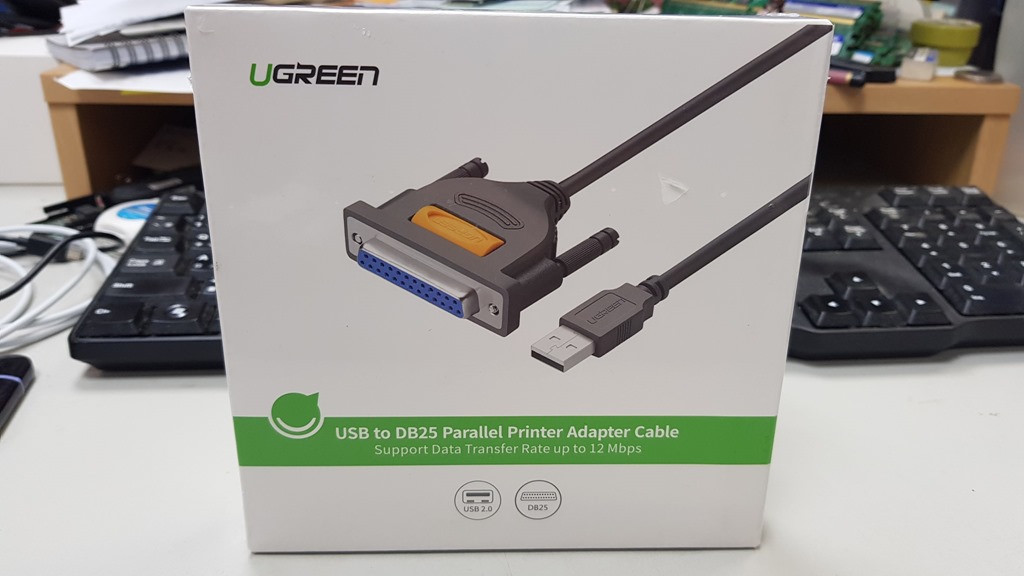
A: 丙式也能賠兩邊嗎? 任意險只能賠對方 保費逐年降低是因為車體殘值降低 新電腦普遍沒有傳統DB25印表機列印埠,有幾種方式解決 1.購買主機板連結配件,通常主機板上還是有保留介面,只是沒附贈連結線材(通常不好買也貴,還不如買USB替代方案) 2.買網路ip列印分享器,成本比較高,但多人連線建議用這 3.usb轉接器,單一電腦的好幫手,也便宜,約100~400之間,我的兩百多質感不錯。 usb轉接db25設定很簡單,只要接上電腦,自動多個usb虛擬印表機介面,本來印表機指向LTP改成指向USB虛擬印表機再選印表機對應驅動即可。
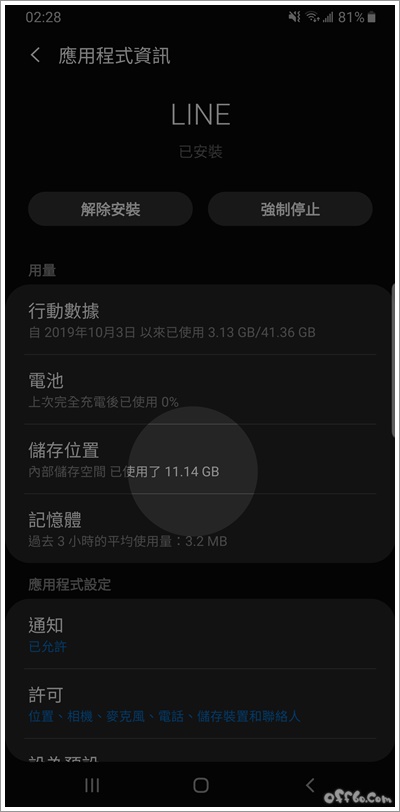
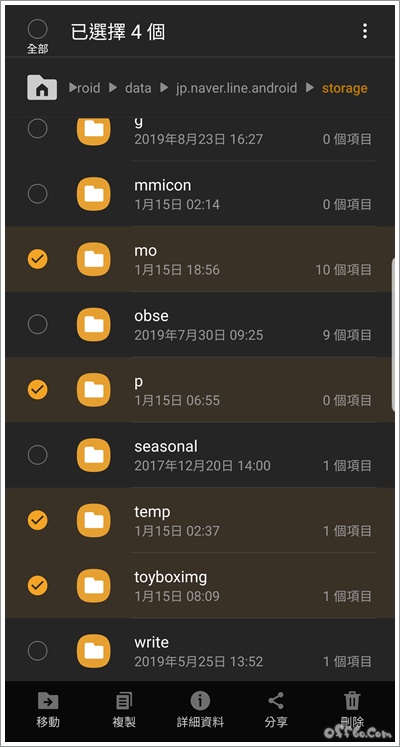
就會累積一些快取資料來占空間, 很久沒去注意到, 直到手機跳出儲存空間不足的警告, 一查詢才發現… 竟然已經佔了11GB多的空間啊!
上網搜尋如何清除快取資料後發現,
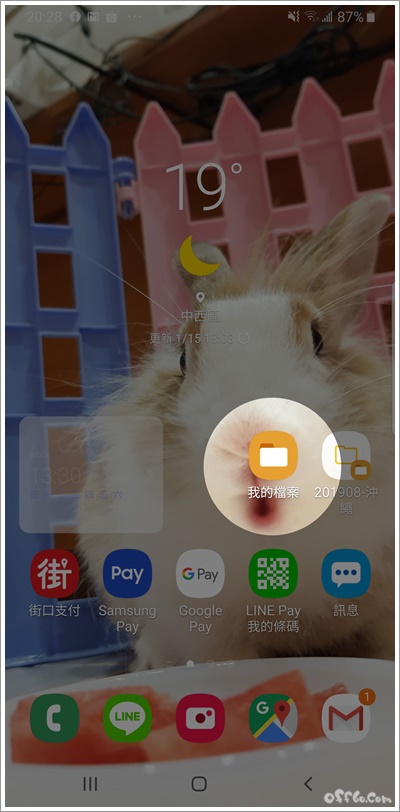
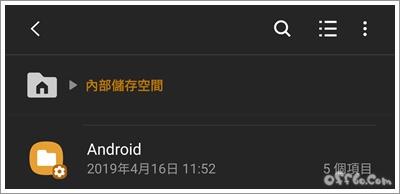
進入「我的檔案」後,
我們要刪除的快取資料,
可以看到清除完快取資料的LINE,
不過如果不擅長操作的話, FOXMAIL最少只能設定14天,我希望能保存八天即可 設定時間與指令 #每日0點10分刪除使用者信箱保留8天 10 0 * * * root find /var/spool/maildir/*/cur -mdate +8 -exec rm {} \; ================== 這邊要處理所有使用者信箱的 cur目錄,讓信件維持在八天左右,超過自動刪除 賺多勞工不會多分(基本的還要65歲後才可以開始拿),虧本勞工要共業(但官員不用),萬無一失的生意,呵呵。 我懷疑官員親屬都滿手台積電 https://money.udn.com/money/story/5607/5223682?from=ednappsharing 政府退休基金 重押護國神山2021-02-02 01:28經濟日報 記者江睿智/台北報導 勞保基金
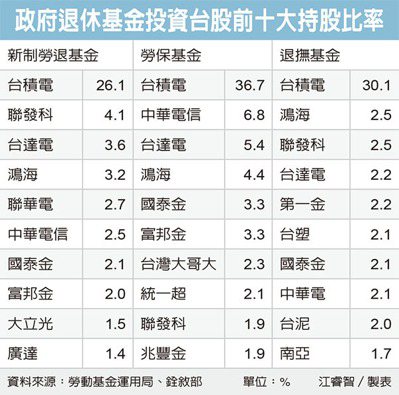
勞動部勞動基金運用局、銓敘部昨(1)日公布勞動基金及公務人員退休撫卹基金國內持股半年報。截至去年底,勞工及公務員退休基金都重押台積電(2330),其中,勞保基金投資台股,台積電占比達36.7%最多;退撫基金則有逾三成押在台積電,新制勞退基金持股台積電也有二成六。
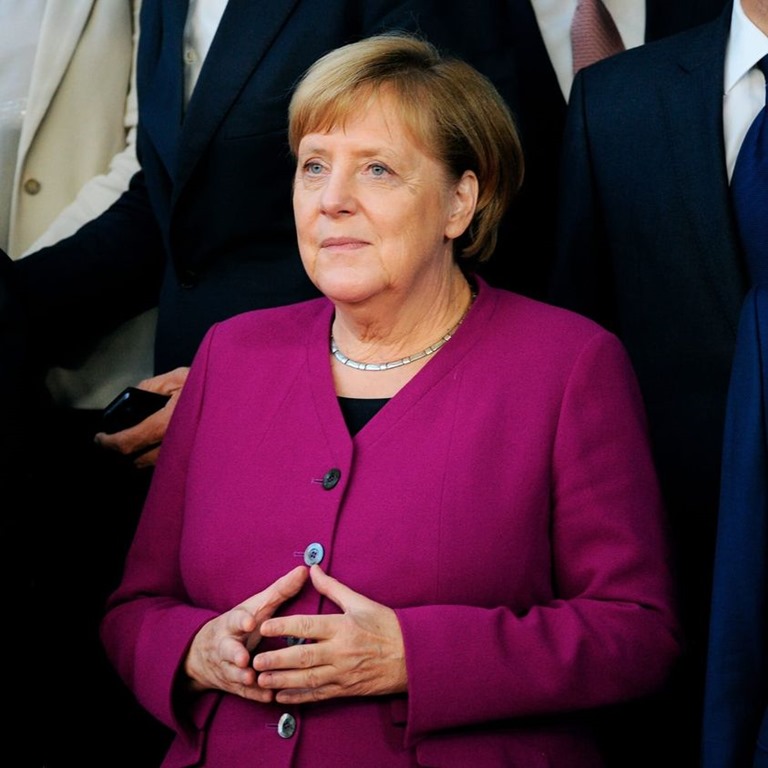
台積電可說是政府退休基金首選,是勞工退休金的「護國神山」。 截至去年底,新制勞退基金規模達逾2.7兆元,其中二成、約5,445億元投資在台股;而持有台積電股票占比達26.1%,超過四分之一、約1,421億元都押在台積電。 在去年6月底,新制勞退基金投資台股,約二成押在台積電。到了去年12月底,勞退新制基金持有台積電比重上升至26.11%。勞金局官員說,主要是台積電去年下半年股價上升,因此占持股比重也跟著水漲船高。 而今台積電股價已站上600元大關,勞工可透過雇主每月提繳月薪6%、以及自行提繳金額,透過新制勞退基金投資,跟著買進台積電當退休金。 勞金局指出,截至去年底,新制勞退基金投資台股持股比重第二高為聯發科,占比4.1%;前十大持股還包括:台達電3.6%、鴻海3.2%、聯電2.7%、中華電2.5%、國泰金2.1%、富邦金2.0%、大立光1.5%、廣達1.4%。反映出新制勞退基金選股偏重科技類股。 值得注意的是,近期漲勢不低的聯電,擠進新制勞退基金投資台股的前十大。 勞保基金去年底規模達7,851億元,約有二成、1,570億元投資台股;其中,台積電占比高達36.7%,換言之,勞保基金約有577億元投資在台積電。 至於勞保基金投資台股持股前十大除台積電外,依序為:中華電信6.8%、台達電5.4%、鴻海4.4%、國泰金3.3%、富邦金3.3%、台灣大2.3%、統一超2.1%、聯發科1.9%、兆豐金1.9%。 她回答說:我是公務員,不是模特兒。—-讓我想起酷酷嫂也是一套黑禮服穿幾次,沒有過多奢華 對比蔡嬤2016年上任就花公帑整修官邸1e,換座車2800萬,花6萬請廚師………. 優秀的公務員都有著相同的特質-清廉自律謙虛低調 昨天,德國在持續6分鐘的熱烈掌聲中向默克爾告別。 德國人通過民主選舉她來領導他們,她以能力、技巧、奉獻精神、正直和真誠領導了8千萬德國人18年。 在她18年的領導生涯中,沒有任何她的違規的記錄。 她也沒有任命任何親戚擔任國務卿。 她沒有聲稱自己是榮耀的創造者。 她沒有賺太多的錢,也沒有人為她的生活喝彩,她沒有得到特許狀和保證,她沒有和她的前輩戰鬥,也沒有解散她。 她同胞的鮮血… 她沒有胡說八道。 她出現在柏林的巷子裡,並不是為了虛榮。 Angelica Merkel被稱為"世界夫人",被形容為相當於600萬男人的女人。 昨天,默克爾離開了黨魁的位置,把它交給了她之後的人,德國和德國人民現在處於最好的狀態。 德國人的反應在德國歷史上是空前的所有的人都走到房子的陽臺上,自發地為她鼓掌,連續鼓掌了六分鐘,沒有流行詩人、渣滓、渣滓、無恥之徒、塗色家和攀登者。 德國人站在一起,向德國領導人告別。 這位化學物理學家不為時尚和燈光所吸引,也不購買房地產、汽車、遊艇和私人飛機,因為她來自前東德。 她在巔峰時期離開德國后離職了。 她離開了,她的親戚沒有說他們是這個國家的長者。 18年沒換過的舊西裝。 願上帝保佑這位沉默的領袖。 在一次新聞發佈會上,一位女記者問默克爾:我們注意到你總是穿同一套西裝; 你沒有另一款式嗎? 她回答說:我是公務員,不是模特兒。 在另一場新聞發佈會上,他們問她:你們有打掃房間、做飯等的女傭嗎? 她的回答是:不,我沒有女工,我也不需要她們。 我丈夫和我每天都做我們自己的家務。 然後另一個記者問:誰洗衣服,你還是你丈夫? 她的回答:我安排洗的衣服,和我的丈夫是誰操作洗衣機,通常是在晚上,因為電力供應更可用,沒有壓力,最重要的是要考慮到鄰居的不便,和鄰居的牆分隔我們的公寓不太厚。 她說:對他們,我以為你會問我在政府工作中的成功和失敗。 默克爾和其他公民一樣住在一間普通的公寓里,她在當選德國總理之前就住在這所公寓里。 她沒有搬到豪宅,也沒有別墅、僕人、游泳池和花園。 這是默克爾,德國總理,歐洲最大的經濟體! #若還有比對資料會造成設備資料被覆蓋的問題在把比對參數關閉即可
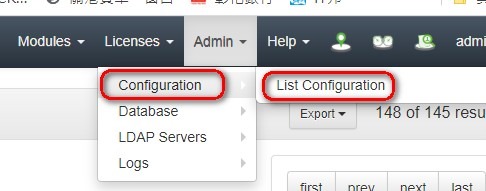
到設定列表
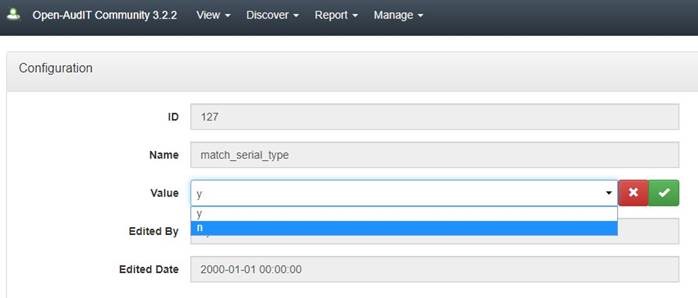
找到比對出問題的參數
關閉此參數
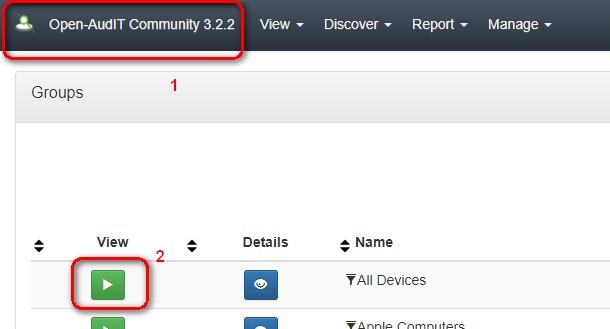
……………………… 查詢設備轉入比對依據 點選LOGO進入GROUP 列表
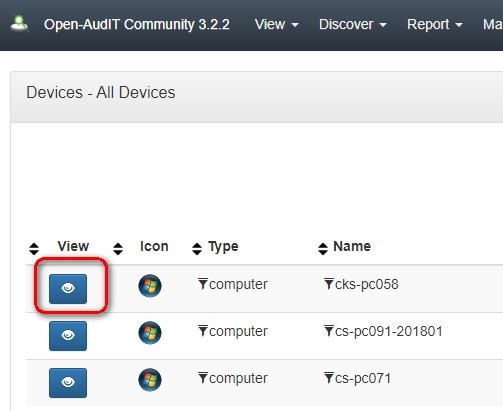
點選要 View 的裝置列表
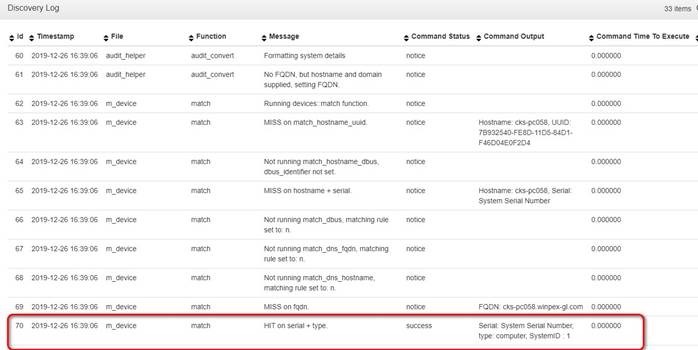
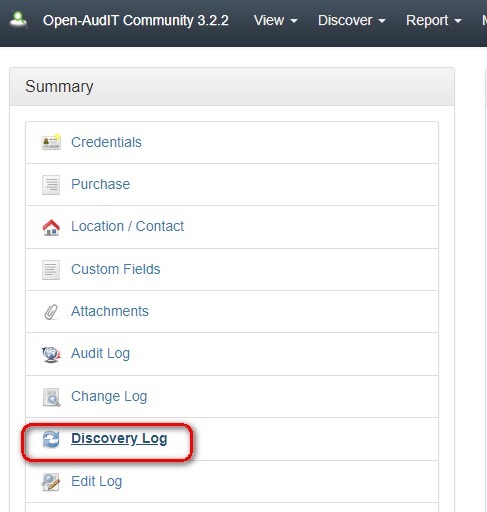
點選DISCOVERY LOG
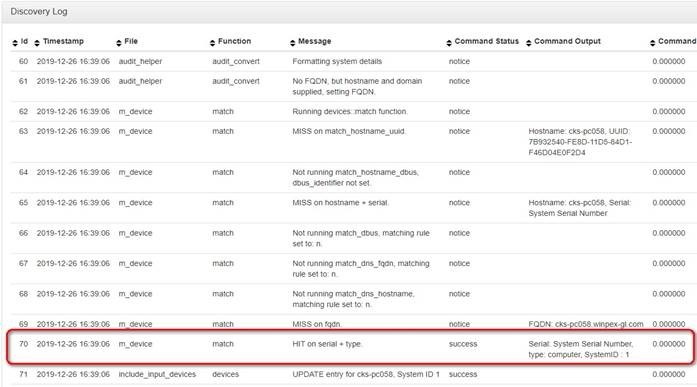
可以看到開頭MATCH的LOG,原來是比對 serial + type 值配對成功,所以以為是同一筆資料覆蓋過去
官方文件 · 由 Mark Unwin创建, 最后修改于十月 17, 2019 Match Process When Open-AudIT receives data about a device, either by discovering the device during an audit run or by the user importing the device, it must determine if this discovered device matches a device that already exists within its database, or if it is a new device that should be added. Open-AudIT uses a series of twelve property matches to determine this. The Match Rules work as OR comparisons, not AND. This means the first rule that matches a field in the discovered device to one in the dB resolves as an existing device. All Matching Rules have to fail in order for a device to be new and result in a new record being created. Duplicate Devices / Missing Devices It is important to note that when Open-AudIT determines a match any properties set to ‘y’ must match exactly (and not be blank) in order for Open-AudIT to determine that the discovered device matches a device already in the database. If none of the properties marked ‘Y’ match, then a new device entry will be created, which could result in duplicate device entries. In situations where properties are duplicated, for example a dbus_id is copied during a VM clone, then an existing device may incorrectly get overwritten/updated rather then a new entry being created resulting in missing devices. Devices will not be matched if their status is set to "deleted". Any other status will allow a match to occur. Matching Linux Devices When matching a Linux based device, we prefer to use the Dbus id concatenated with the hostname. We can also use other options as per the above table, but we can retrieve the Dbus ID without root. To retrieve the UUID (from the motherboard), we need to run dmidecode, which does require root. Unfortunately, when you clone an ESXi guest, the Dbus ID does not get recreated – hence our concatenating this with the hostname. There is a good article linked here that details the why’s of hardware IDs. http://0pointer.de/blog/projects/ids.html Match Order The logic for device matching is contained in the m_devices.php file, which on a Linux install can be found here: /usr/local/open-audit/code_igniter/application/models/ Matching is conducted in the following order: 1. Match the Opmantek UUID (not configurable). 2. Match the Google Cloud ID (not configurable). 3. match_hostname_uuid 4. match_hostname_dbus 5. match_hostname_serial 6. match_dbus 7. match_dns_fqdn 8. match_dns_hostname 9. match_fqdn 10. match_serial_type 11. match_serial 12. match_sysname_serial 13. match_sysname 14. match_mac (ip table) 15. match_mac (network table) 16. match_mac (addresses) 17. match_ip 18. match_hostname 19. match_ip_no_data Matching IP Addresses As at Open-AudIT 3.3.0 we will be implementing a match routine that essentially says "If all I have is an IP, and that IP belongs to a device in the database and that device has not been audited, match that device regardless of the match_ip rule. The reason for this is in the case of a discovered device that we don’t have credentials for, we have virtually no information except the IP and maybe the DNS Hostname. Neither are considered unique (think DHCP). But in the case where we have a device with that lack of data already preset in the database, assume it is the same device so that we don’t create many false duplicates. This configuration item will be called match_ip_no_data and will be set to YES by default. Match Properties These properties are stored in Open-AudIT’s configuration; to access them select Admin -> Configuration -> Discovery from Open-AudIT’s menu. The default values of ‘y’ and ‘n’ simply mean YES and NO. We will use YES and NO in the description, rather than ‘y’ and ‘n’. The stored value should always be either a lowercase y or n. The properties and their default values are listed below.
以前月薪/22天(上班日) = 日薪 現在月薪/30天 = 日薪 不加班的人,可能無感,但如果你加班的話,加班費變相減少,很多人不知道有這層關係。 這其實跟國民智商有關………….終於知道為何帝王術要讓人民變笨點,因為好控制………. 範例算法來比較,情境如下: 假設月薪36000,平日加班4小時。 舊的算法(一般公司都優於勞基法): 36000/22=1637(日薪) 1637/8=205(時薪) 平日加班的話前兩小時1.33,超過兩小時1.66 205*2*1.33=545(加班前兩小時) + 205*2*1.66=681(後兩小時) = 1226 新的算法: 36000/30=1200(日薪) 1200/8=150(時薪) 平日加班的話前兩小時1.33,超過兩小時1.66 150*2*1.33=399(加班前兩小時) + 150*2*1.66=498(後兩小時) = 897 新的加班方式雖然假日加班說你做一個小時也是給八個小時,假設你來公司一小時你也可以拿到1200,但公司是笨蛋讓你來一小時? 怎麼算都是舊的方式加班費比較划算! 百姓收入越來越少,物價卻越來越貴,這是不爭的事實,你也可以繼續覺得沒這麼糟糕,沒有憂患意識的苟且活下去,反正還不至於影響到你讓你不能生存,這苦你還吞得下去。 程式範例
INI檔案範例
文章出處 JSON文件範本(可貼到 https://jsoneditoronline.org/#left=local.lapedo&right=local.vaxeha 幫你線上格式化JSON比較好看懂) { DELPHI JSON lkJSON 程式範例 procedure TForm1.BlaBlaBla( JSonString : string );
ii : integer;
Trash : boolean;
// Parse the String
// Values on the first level are as easy as this
// let’s digg into each document …
// each document is a TlkJSONobject …
// So, it will be so simple to get something like this…
end;
js.Free; |
||||||||||||||||||||||||||||||||||||||||||||||||||||||||
|
Copyright © 2026 No Money No Honey - All Rights Reserved |
||||||||||||||||||||||||||||||||||||||||||||||||||||||||





近期留言